WALLET-BASED LOYALTY

Turn passing customers
into regulars.

A loyalty engine that works without an app. The card lives in the phone wallet.

No credit card required. Setup takes a few minutes.

Montipass Café loyalty card: six of eight stamps collected, two visits left to the reward
DASHBOARD

Who came in, who needs a nudge. On one screen.

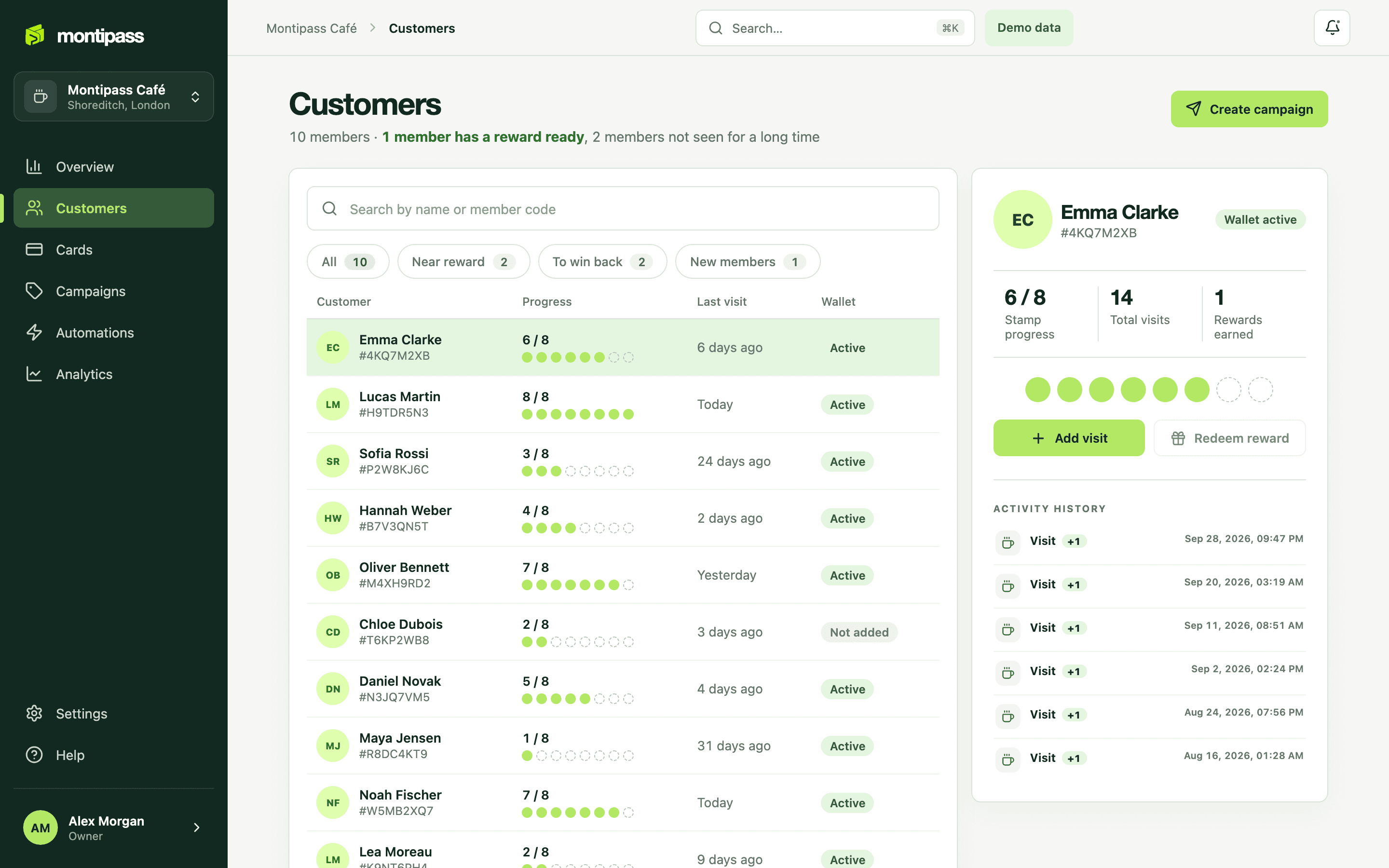
Customer list, stamp distribution, visit history and a live card preview in one place.

Customers view in the Montipass business dashboard: stamp distribution and member details
Dashboard: customers view
WHY MONTIPASS

Your loyalty program, in your own brand.

A digital stamp card for iPhone and Android. You choose the card colour, logo and message; keeping the card up to date on the phone and delivering notifications is our job.

THE DIFFERENCE

A loyalty card that never gets lost in a drawer

The card lives in the customer's phone wallet. The moment staff scan it, the stamp count updates on the phone, seconds after the sale at the counter. No app to download, no account to create.

See the feature
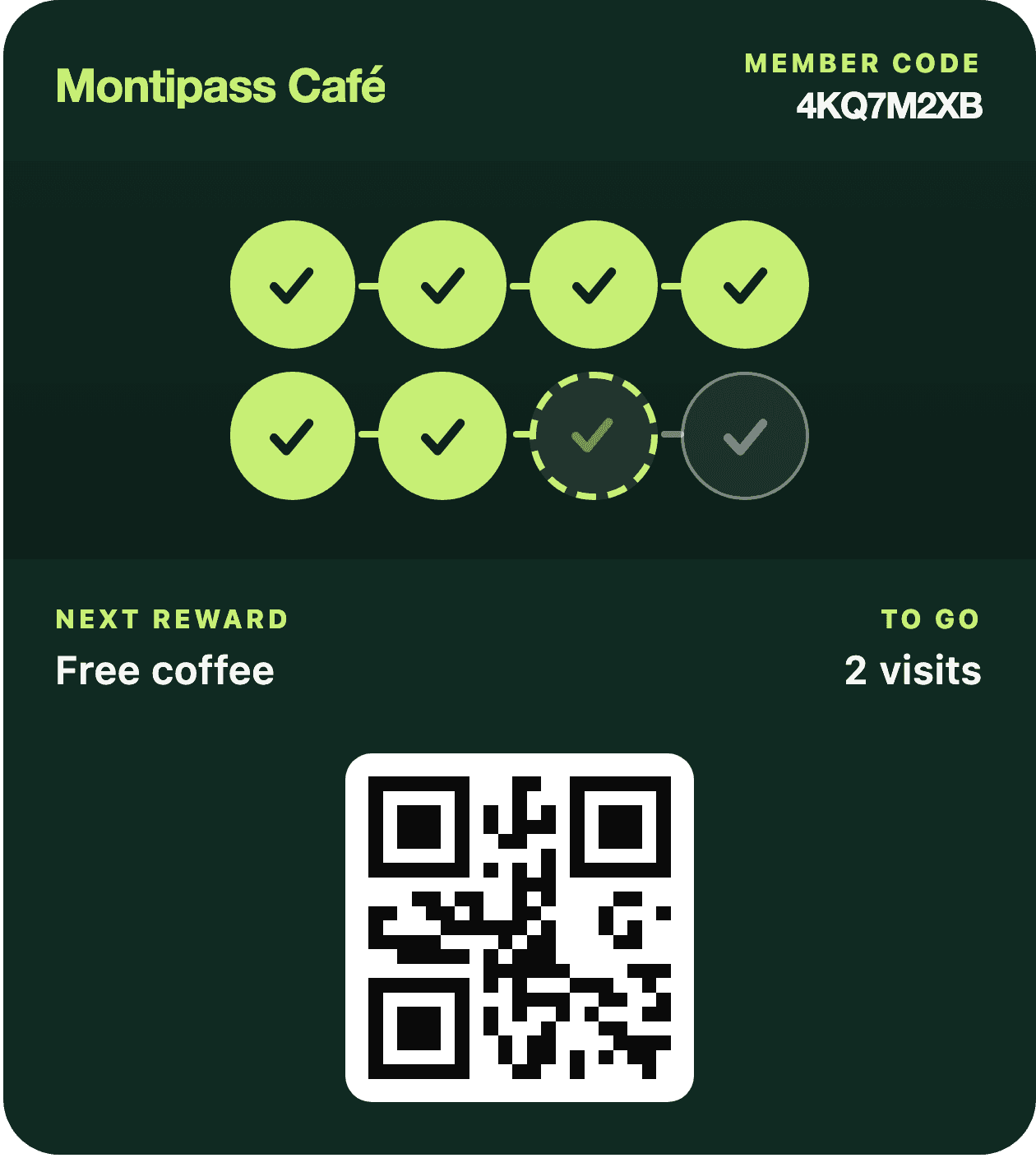
A customer's wallet card previewed in the dashboard: six of eight stamps collected
Card preview in the dashboard

Rules that bring customers back

Set them up once and let them run in the background: a reminder for customers who have not visited in 21 days or more, a nudge for those close to a reward, a message on a set date. Each one fires on its own when its condition is met.

See the feature

Messages straight to the lock screen

The channel is the wallet card itself. No separate app, no SMS bundle, no spam folder. You write the message and it appears on the lock screen of your cardholders.

See the feature

Who is coming back, who is drifting away

An operations dashboard, not a management report. Every visit, how many visits each campaign brought in, the weekly trend and program health. One location or the whole chain, in the same view.

See the feature
MOST ASKED

“Most of my customers use Android.” Will it work?

Yes. The card goes into the wallet on both phones: Apple Wallet on iPhone, Google Wallet on Android. On neither side does the customer download an app or create an account; they scan the QR code at the counter and type their name.

In both wallets the stamps appear one by one on the card, in the business’s own colour. The card updates itself on every visit.

Apple and Google each draw the layout themselves, so the two cards do not look identical. The stamps, colours and reward are the same on both.

HOW IT WORKS

Live in three steps

Design your card

Choose your business name, reward rule and card colour. Upload your logo and see it in the preview instantly.

Share the QR code

Place it at the counter, show it on a screen or share it on social media. The same QR code also works as a referral invitation.

Scan and count

Staff scan the card in staff mode. Visits and rewards are recorded in real time and the card updates itself.

FREQUENTLY ASKED

Questions from cafés

How long does setup take?

A few minutes. Once you choose your business name, your first program and your card colour, you are live. No changes to your POS or hardware are needed.

How does a customer add the card?

They scan the QR code at the counter and tap “Add to wallet” on the page that opens. No app to download, no account to create: two taps.

How do staff give a stamp?

In staff mode they scan the QR code on the customer's card. A visit or a reward is recorded with one tap and the count on the card changes in real time.

Can I change the card design later?

Yes. Update the colour, logo and message in the dashboard and choose “Publish to cards”; the change reaches existing cards as well.

I do not have an iPhone. Does it work on Android?

It does. The card goes into Apple Wallet on iPhone and Google Wallet on Android. In both wallets the stamps appear one by one on the card, and the card updates itself on every visit.

How many locations can I use it in?

It depends on your plan, from a single café to a multi-location chain. Analytics and reports are broken down by location.

Set it up today, give your first stamp tomorrow.

Choose your business name and reward rule, design your card and put the QR code at the counter. Your POS, the devices at your till and the way you work stay as they are. We are in a pilot period: there is no charge and we do not ask for card details.